

Documentation Index
Fetch the complete documentation index at: https://lightdash-mintlify-7ef85b36.mintlify.app/llms.txt
Use this file to discover all available pages before exploring further.
Service accounts require an Enterprise License Key.
Overview
Service accounts provide machine-to-machine authentication for automated access to the Lightdash API. Unlike personal access tokens which are tied to individual users, service accounts are organization-level entities designed for applications, CI/CD pipelines, and automated workflows. Service accounts allow you to:- Authenticate API requests without using personal user credentials
- Grant specific permission scopes (read, edit, or admin)
- Set expiration dates for tokens
Enabling service accounts (self-hosted only)
If you’re self-hosting Lightdash, you will need to add the following environment variable to your configuration:Creating a Service Account
- Navigate to General Settings → Service Accounts
-
Click Add Service Account
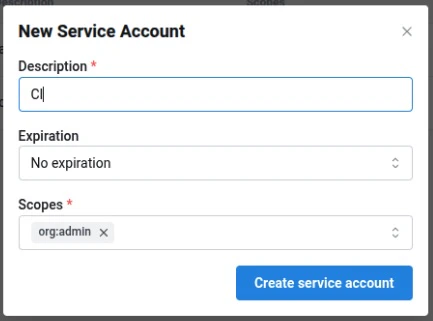
- Enter a Description and optional Expiry
- Select one or more Scopes to grant
- Click Create service account
-
Copy the generated token. This is the only time it will be shown. All service account tokens will be prefixed with
ldsvc_
Scopes
Scopes are hierarchical - granting a higher-level scope (e.g.org:admin) automatically includes all lower-level permissions (e.g. org:edit, org:view).
| Scope | Description |
|---|---|
org:view | Read-only access to Lightdash content. |
org:edit | Can create/modify Lightdash content (charts and dashboards), and all org:view permissions. |
org:admin | Full organization-level control. Includes deploy, preview, download/upload, user-management, and all org:edit & org:view permissions. |
Using service accounts
With Lightdash CLI
You can use service account tokens to authenticate with the Lightdash CLI:With the API
Service account tokens use theAuthorization header:
Example Use cases
CI/CD automation
Use service accounts to automatically deploy dbt changes to Lightdash in your CI/CD pipeline. See deploying with GitHub Actions for implementation details.Instance initialization
When setting up a new self-hosted instance, configureLD_SETUP_SERVICE_ACCOUNT_TOKEN to initialize with a service account. See the environment variables guide for details.
Automated reporting
Use service accounts to programmatically export dashboard data, schedule reports, or integrate Lightdash data into other systems via the API.Service account attribution
Service accounts are designed to be used by automations such as CI/CD pipelines, replacing personal access tokens tied to individual users. However, because foreign key constraints in Lightdash currently require actions to be attributed to a real user UUID, actions performed by a service account are recorded under a human user — typically the user who created the service account.Fallback attribution
When the creator of a service account has been deleted, Lightdash falls back to attributing the action to the oldest admin in the organization (bycreated_at timestamp, with user_uuid ascending as a tie-breaker). This selection is deterministic: the same service account will always resolve to the same fallback admin until that admin is also deleted, ensuring consistent attribution across requests and audits.